Table of Contents
Introduction
Finding the best heads-up display for cars can meaningfully improve how you interact with your vehicle while driving. Rather than glancing down at a speedometer or reaching for your phone to check navigation, a quality HUD projects essential data directly into your natural line of sight – keeping your attention exactly where it belongs.
Whether you’re after a premium windscreen projection unit or an affordable heads-up display for cars that simply shows speed and overspeed alerts, the HUD market in 2026 offers more practical, well-built options than ever. From OBD-connected smart gauges to standalone GPS-based speedometers, today’s best head-up displays for cars are cleaner, brighter, and easier to install than the early generation of aftermarket units.
This guide covers the top 6 head-up displays for cars in 2026 — selected for display clarity, accuracy, ease of installation, and real-world driving value.
What is a heads-up display for cars?
A Heads-Up Display (HUD) is an advanced in-car system that projects essential driving data directly within the driver’s natural field of vision, removing the need to look away from the road to check speed, navigation, or vehicle diagnostics.
Originally a technology developed for military aviation, HUDs have become one of the most practical driver-assistance tools available in the automotive aftermarket. In 2026, even budget-friendly car HUD devices offer features — like GPS accuracy, automatic brightness adjustment, and OBD2 fault code reading — that were once exclusive to factory-installed systems in luxury vehicles.
Key Benefits
- Enhanced safety on the road — By displaying speed, navigation prompts, and warning alerts directly on the windscreen or a dedicated combiner screen, HUDs eliminate the need to break visual contact with the road ahead.
- Real-time driving data — Drivers receive instant updates on speed, voltage, water temperature, engine performance, and satellite time, allowing for more informed decisions at every stage of a journey.
- Improved speed awareness — The heads-up display speedometer delivers precise readings in all lighting conditions, including low light and direct sunlight, supporting consistent compliance with speed limits.
- Simple installation — Modern car HUD devices are predominantly plug-and-play, using USB or OBD2 ports. No dashboard modification or complex wiring is needed.
- Smarter driving habits — Overspeed warnings, fatigue reminders, and voltage alerts help drivers stay alert and proactive rather than reactive.
How to Choose the Best Heads-Up Display for Cars
Choosing the right HUD depends on your vehicle type, daily driving needs, and the level of data you want accessible at a glance. Here are the key factors that matter in 2026:
- Display clarity and size — Prioritise a heads-up display projector with a bright, sharp image that remains readable in both direct sunlight and low-light conditions. Larger screens (5 inches and above) offer easier readability without requiring the driver to focus.
- Compatibility with your vehicle — GPS-based HUDs work with virtually every vehicle. OBD2-based units require a compatible diagnostic port, which is standard on most vehicles manufactured after 1996 in the US. Check your vehicle year and port location before purchasing.
- Installation simplicity — Look for models that use USB or OBD2 plug-and-play connections. Avoid units that require permanent dashboard modifications unless you have professional installation available.
- Information display range — Choose a HUD that shows the metrics you actually use: speed, navigation prompts, RPM, voltage, engine fault codes, or all of the above. More data isn’t always better — clarity and relevance are what matter.
- Automatic brightness adjustment — A HUD with an intelligent light sensor maintains optimal screen brightness at all times. Without this feature, displays become unreadable in bright daylight or overly harsh at night.
- Build quality and certification — Look for units with CE, FCC, or ROHS certification as a baseline quality indicator. ABS plastic and polycarbonate housings perform well across temperature ranges typical of car interiors.
- Safety alert features — Overspeed alarms and fatigue driving reminders are particularly valuable for highway and long-distance driving. These are standard in most mid-range and above HUD models in 2026.
- Budget and warranty coverage — Capable GPS-based HUDs start at under $30, while full OBD+GPS dual-mode units with larger screens typically range from $40 to $80. Most reputable brands include a 12-month warranty minimum.
If you’re building out a broader tech-forward interior setup, pairing your HUD with a portable HD screen with Apple CarPlay creates a genuinely capable driving environment without requiring a full infotainment system replacement.
Product Comparison Table
| Image | Product | Details | Price |
|---|---|---|---|
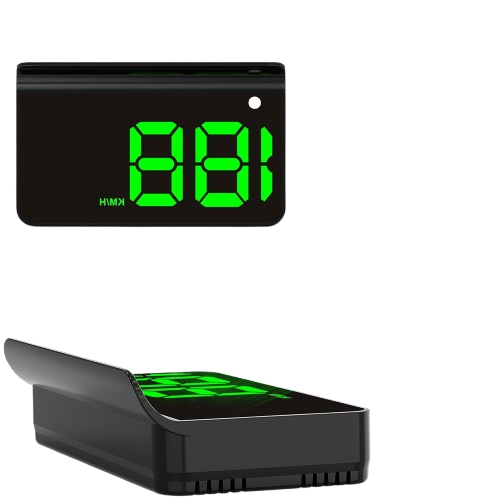 |
K 1 Digital GPS HUD Speedometer | Features a large-font display with dual GPS/BDS chip for fast, accurate speed readings and auto brightness adjustment. | Check Price |
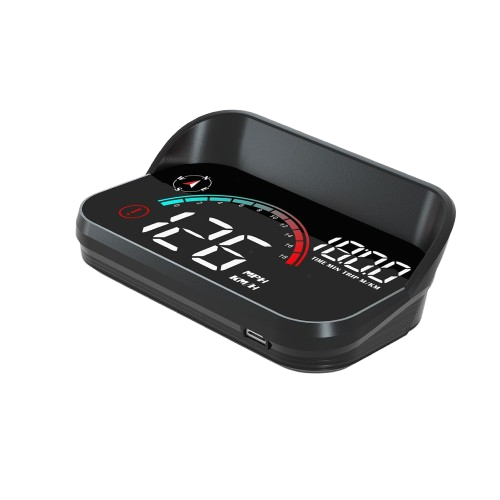 |
AZIJYV M 22 Windshield Speedometer Projector | Projects real-time speed and driving data onto the windshield, including over speed alerts and auto power on/off with ignition. | Check Price |
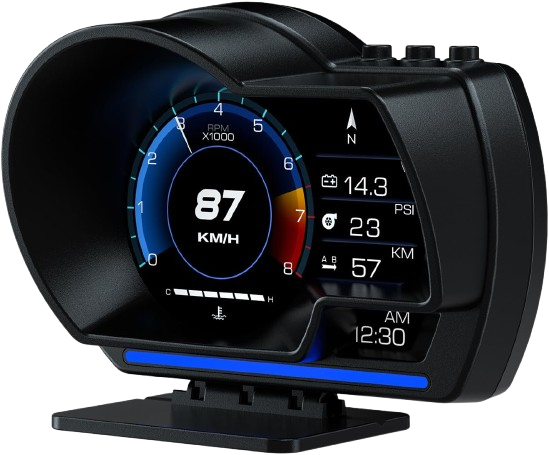 |
Wiiyii Car HUD P 6 OBD + GPS Smart Gauge | The Car HUD P 6 integrates both OBD and GPS technologies to show personalised driving data and diagnostic codes, featuring ambient light notifications to enhance driving safety. | Check Price |
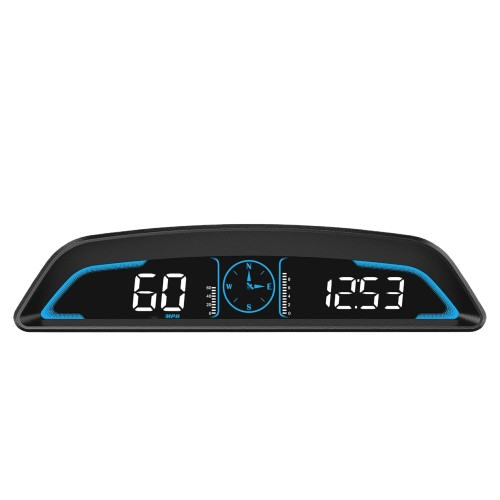 |
Sino Track ST-HUD-G3 Large 5.5” LCD GPS HUD | Offers a wide screen with fatigue and speed alerts, built-in compass, and multiple display modes for comprehensive driver assistance. | Check Price |
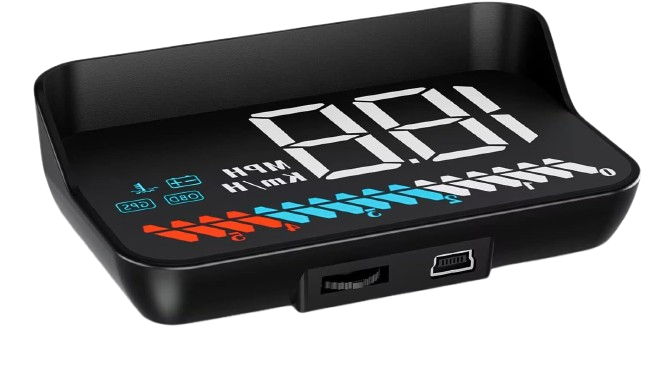 |
Car HUD M7 OBD/GPS Smart Gauge | Compact HUD that delivers real-time speed, RPM, voltage, and temperature data with plug-and-play installation and auto brightness control. | Check Price |
Are You in a Hurry?
If time is limited and you want to upgrade your vehicle with a heads up display projector quickly and hassle-free, the KUOWEI K1 and AZIJYV M22 are top choices. Both models feature easy USB plug-and-play setups, eliminating complex installation steps. Their clear, large displays and smart brightness adjustments ensure you stay informed without distraction. Plus, AZIJYV’s overspeed alert adds an extra layer of safety on the road. These devices are perfect for drivers who want immediate benefits with minimal setup time.
Quick Picks for Easy Heads Up Display Setup
Get a reliable heads up display projector installed fast with these user-friendly options that require minimal effort but deliver maximum safety and convenience.
- Plug-and-Play USB Setup — Installs instantly without complicated wiring.
- Large, Clear Display — Easy-to-read numbers ensure quick speed checks at a glance.
- Auto Brightness Adjustment — Automatically adapts to lighting for optimal visibility day or night.
Top 5 Products of Best Heads Up Display for Cars
1. Heads Up Display for Cars — Digital GPS HUD Speedometer with Large Font & Auto Brightness
The KUOWEI K1 Digital GPS HUD Speedometer is a clean, accessible entry into windscreen-projected speed monitoring. Its dual-mode GPS and BDS chip delivers fast satellite acquisition and reliable speed accuracy in a package that requires nothing more than a USB port to operate. For drivers who want straightforward speed data without any complex setup, this is the most practical starting point in 2026.
Product Specifications
| Feature | Details |
|---|---|
| Model | K1 |
| Brand | KUOWEIHUD |
| Display Type | TFT LCD Display |
| Speed Display Unit | MPH (default), max 115 mph |
| Signal Type | GPS + BDS (Dual-Mode Chip) |
| Material | ABS (Acrylonitrile Butadiene Styrene) |
| Auto Brightness Adjustment | Yes |
| Dimensions (L x W x H) | 2.76 x 1.69 x 0.79 inches |
| Weight | 1.6 ounces |
| Connection Type | USB (Plug-and-Play) |
| Compatibility | All vehicles with USB port |
Key Features
- Dual-mode GPS + BDS chip for faster satellite lock and more accurate speed tracking
- Large-font digital display ensures readability regardless of lighting conditions
- An intelligent light sensor automatically adjusts screen brightness for day and night driving
- USB plug-and-play installation — compatible with any vehicle USB port
- Universal compatibility across cars, motorcycles, and trucks
- Metal shading technology minimises reflection for cleaner windscreen visibility
- Real-time speed display up to 115 mph with minimal latency
Pros
- Fast satellite acquisition — connects to up to 32 satellites
- Readable display in direct sunlight and low-light conditions alike
- No installation complexity — operational within minutes
- Slim, lightweight profile fits most dashboard placements
- Works across vehicle types, including motorcycles
Cons
- May show brief signal delays in tunnels or metal-heavy environments
- Minor GPS-inherent speed variation (0.6–1.8 mph) is normal for satellite-based devices.
Why We Recommend It
The K1 GPS HUD earns its place at the top of this list through consistent, reliable performance. Its large display and auto-brightness make it immediately useful, and the plug-and-play USB setup means it’s ready to use without any technical knowledge. For everyday commuters and highway drivers alike, it delivers the core value of a heads-up display for cars without unnecessary complexity.
2. Windshield Speedometer Projector — Digital GPS HUD with Overspeed Alerts for All Vehicles
The AZIJYV M22 takes a step beyond basic dashboard placement by projecting speed data and driving metrics directly onto the windshield surface, creating a true heads-up display experience. Its overspeed alert system and auto on/off ignition integration make it one of the safest options in its price range.
Product Specifications
| Feature | Details |
|---|---|
| Brand | AZIJYV |
| Model | M22 |
| Material | ABS |
| Dimensions | 3.7 x 1.9 x 1 inches |
| Weight | 1.41 ounces |
| Screen Size | 2.9 inches |
| Display Type | Flat GPS HUD with Windshield Projection |
| Speed Unit Options | MPH / KMH |
| Power Connection | USB Plug & Play |
| Automation | Auto On/Off with Ignition |
Key Features
- Projects digital speed and essential driving data directly onto the windshield surface
- Displays speed, travel time, clock, distance, and GPS-based compass direction
- Overspeed alerts with customisable speed thresholds
- Automatically powers on and off with vehicle ignition
- USB plug-and-play installation with no wiring required
- Manual and auto brightness control (11 levels)
- Compatible with windshield reflective film for improved daytime visibility
- Compact, lightweight housing for unobtrusive placement
Pros
- Compatible with all vehicle types
- An overspeed alarm adds a tangible safety layer for highway use
- Auto on/off eliminates the need to manually power cycle
- Quick to install and configure
- Adjustable brightness and speed unit settings
Cons
- May experience brief signal delays in tunnels or parking structures
- Not ideal for vehicles with metallic-coated or heated windshields
- Projection clarity depends on the quality of satellite reception
Why We Recommend It
The M22 is the natural choice for drivers who want a genuine windshield projection experience rather than a dashboard-mounted screen. The combination of overspeed alerts, ignition automation, and straightforward USB setup makes it a safety-first HUD that still keeps installation simple. It’s particularly well-suited for regular highway commuters and longer-distance drivers.
Upgrade your driving experience with this all-in-one GPS HUD – stay alert, drive smart.
Pairing your HUD with a best wireless Bluetooth adapter for car allows hands-free audio and navigation to work alongside your heads up display — building a more complete driver-assistance setup without permanently modifying any wiring.
3. Car HUD P6 — OBD+GPS Smart Gauge for Most Cars
The Wiiyii Car HUD P6 is the most data-rich unit in the mid-range category, combining OBD2 diagnostics and GPS speed tracking in a single compact display. For drivers who want to monitor engine health alongside standard speed data – and have the ability to read live fault codes – this is the most capable option under $60 in 2026.
Product Specifications
| Feature | Details |
|---|---|
| Brand | Wiiyii |
| Display Type | LCD |
| Modes | OBD + GPS Dual Mode |
| Screen Size | 1.38 inches |
| Installation Options | Dashboard or Windshield |
| Dimensions (L x W x H) | 5.24 x 3.54 x 4.33 inches |
| Item Weight | 190 grams (6.7 oz) |
| Ambient Light Feature | Auto-adjusting blue/red alert lighting |
| Protocol Compatibility | Most OBD2 vehicles |
Key Features
- Dual OBD and GPS modes — switch between sources based on availability and data preference
- Real-time speed displayed directly in the driver’s line of sight
- Live fault code reading and OBD2 data stream monitoring
- 10 customisable display interfaces for a personalised driving view
- Automatic ambient light adjustment with colour-based alerts
- Easy non-destructive installation with adjustable mounting bracket
- Compatible with most OBD2-compliant vehicles made after 1996
Pros
- Dual-mode operation maximises compatibility across vehicle types
- Engine diagnostics and speed monitoring in one display
- Colour-coded alerts improve at-a-glance safety awareness
- Multiple mounting positions to suit different dashboard layouts
- Prevents overspeeding by surfacing speed data clearly
Cons
- OBD2 mode unavailable on vehicles without a compatible diagnostic port
- A smaller screen size may not suit all drivers’ visibility preferences
- Initial interface configuration requires a brief setup period.
Why We Recommend It
The P6 is the clear pick for technically engaged drivers who want their HUD to do more than show speed. The ability to pull live engine data and read fault codes directly from the display – without connecting a separate OBD2 scanner – adds genuine diagnostic value. Drivers who frequently monitor their vehicle’s engine health will find this unit saves time and provides earlier warning of potential issues.
For a dedicated diagnostic tool to complement your HUD setup, the best OBD2 scanner for Chevy Silverado guide covers professional-grade scanning options for truck owners specifically.
4. SinoTrack Digital GPS Speedometer — 5.5″ LCD HUD with Trip Meter & Fatigue Alert
The SinoTrack ST-HUD-G3 is the standout large-screen option in this roundup. With a 5.5-inch LCD display, it delivers a level of visibility and data density that smaller HUD units simply cannot match. Its fatigue alert system — which triggers after four consecutive hours of driving — makes it the most safety-comprehensive GPS HUD for long-distance travel in 2026.
Product Specifications
| Feature | Specification |
|---|---|
| Brand | SinoTrack |
| Model Number | ST-HUD-G3 |
| Screen Size | 5.5 inches |
| Material | ABS |
| Dimensions (L x W x H) | 6.6 x 1.6 x 1.7 inches |
| Item Weight | 80 grams (2.82 oz) |
| Power Supply Voltage | 5V |
| Country of Origin | China |
Key Features
- Large 5.5-inch LCD screen displaying comprehensive driving metrics
- Dual speed scale showing MPH alongside real-time satellite count
- Built-in compass for precise directional guidance without phone dependency
- Audible overspeed alarm with a customisable speed threshold
- Fatigue driving alert triggers automatically after 4 continuous hours on the road.
- Auto-brightness adjustment maintains readability from dawn to dusk.
- Advanced processing chip ensures smooth, real-time data updates with minimal latency
- Multiple display modes: speed, direction, mileage, driving time, satellite count
- USB-powered with single-button control for simplicity
- Durable ABS casing with lightweight build for universal vehicle compatibility
Pros
- Largest screen in this roundup — significantly reduces driver effort to read data
- Dual alerts for speeding and fatigue make it uniquely suited for long-haul driving.
- Auto-brightness maintains clarity in all lighting conditions.
- Simple one-button interface reduces cognitive load while driving
- Accurate real-time GPS data with minimal lag
Cons
- Mileage data resets after the unit is powered off — no cumulative memory
- Screen brightness may reduce slightly if the sensor is partially obstructed.
Why We Recommend It
The ST-HUD-G3 is the best choice for drivers who spend extended time on the highway and want a heads-up display for cars that actively contributes to fatigue management. The fatigue alert feature alone sets it apart from everything else at this price point. Combined with the large, easy-to-read screen, this unit genuinely reduces the mental overhead of long drives – which is precisely the purpose a quality HUD should serve.
Enhance your driving experience and safety with the SinoTrack Digital GPS Speedometer – the smart companion every driver needs.
5. Car HUD M7 — OBD/GPS Smart Gauge with RPM, Voltage, Temperature, and More
The Wiiyii Car HUD M7 is a compact dual-mode head-up display that punches above its size by delivering real-time RPM, voltage, water temperature, and speed data alongside standard GPS speed monitoring. For drivers of older or mechanically complex vehicles who want to keep an eye on engine health at a glance, the M7 covers everything that matters without taking up dashboard real estate.
Product Specifications
| Feature | Details |
|---|---|
| Display Type | Head-Up Display (HUD) |
| Screen Size | 2.1 inches |
| Material | Plastic |
| Item Dimensions | 3.54 x 2.09 x 1.02 inches |
| Item Weight | 150 grams |
| Display Modes | OBD / GPS |
| Data Displayed | Speed, RPM, Voltage, Water Temp |
| Installation | Plug-and-play |
| Brightness Control | Auto-adjusting |
| Power Supply | OBD or USB (GPS mode) |
| Compatibility | GPS: All vehicles; OBD: Vehicles post-1996 |
| Certifications | CE, FCC, ROHS |
Key Features
- Dual OBD and GPS compatibility for broad vehicle support
- Displays speed, RPM, voltage, and water temperature in real time
- Built-in speed, voltage, and temperature warning alarms
- Automatic brightness adjustment for day and night visibility
- Plug-and-play installation — no dashboard modification required
- Switchable display units (km/h or mph, °C or °F)
- Compact, lightweight design with easy dashboard mounting
- CE, FCC, and RoHS certified for quality assurance
Pros
- Supports both OBD and GPS modes for maximum compatibility
- Displays engine metrics that standard GPS HUDs cannot access
- Auto-brightness keeps the screen readable without driver adjustment
- Quick and clean installation in either mode
- Certified build quality adds reliability and confidence
Cons
- OBD mode incompatible with EVs and certain diesel truck configurations
- • A 2.1-inch screen may feel small for drivers accustomed to larger displays
Why We Recommend It
The M7 is the ideal choice for drivers who want both GPS-based speed accuracy and live engine health monitoring from a single compact unit. Its certifications, dual-mode operation, and real-time engine alerts make it one of the most well-rounded compact HUDs available in 2026. The small footprint is a genuine advantage for vehicles with limited dashboard space.
Enhance your driving experience with the Car HUD M7 – a compact, intelligent display that keeps your focus where it belongs: on the road.
How Does a Heads-Up Display Work?
A heads-up display projects essential driving information directly into the driver’s natural line of sight, eliminating the need to shift visual attention away from the road.
The system uses a combination of GPS satellite data, onboard vehicle diagnostics (OBD2), and digital display technology to generate real-time metrics, including speed, navigation directions, RPM, voltage, and safety alerts. In-car head-up displays with navigation systems, GPS coordinates are integrated with turn-by-turn map data and reflected onto a transparent combiner surface — either the windshield itself or a separate transparent screen mounted on the dashboard.
The projection mechanism works by directing light from a microdisplay unit toward the windshield or combiner at an angle calculated to appear within the driver’s forward field of vision. Modern HUDs use anti-reflective coatings and automatic brightness adjustment to maintain image clarity across all lighting conditions, from bright midday sun to nighttime motorway driving.
More advanced units — particularly those using OBD2 connectivity — also pull live data streams directly from the vehicle’s engine control unit (ECU), enabling the display of fault codes, coolant temperature, RPM, and battery voltage alongside GPS-sourced speed data. According to research from the National Highway Traffic Safety Administration (NHTSA), driver distraction from dashboard glances is a significant contributing factor in preventable road incidents — a problem HUD technology directly addresses by keeping data visible without requiring the driver to redirect their gaze.
Can You Get Google Maps on a Heads-Up Display?
This is one of the most frequently searched questions around aftermarket HUDs, and the answer depends on the device type.
Standalone GPS HUDs – such as the models reviewed in this guide – do not connect to Google Maps or any third-party navigation app. They use an internal GPS module to calculate and display speed, direction, and distance data, but they do not stream turn-by-turn navigation from a smartphone.
For Google Maps integration on a heads-up display, you would need one of the following:
- A factory-fitted OEM HUD that integrates with your vehicle’s infotainment and navigation system
- A smartphone-connected smart display system that mirrors apps, such as an Apple CarPlay or Android Auto-enabled head unit
If navigation projection is a priority alongside your HUD, a portable HD screen with Apple CarPlay offers a practical way to bring full map navigation to your dashboard without factory installation. For full wireless phone mirroring, a best wireless CarPlay adapter can activate CarPlay on compatible head units that previously required a cable connection.
Is a Heads-Up Display Worth It in a Car?
For most drivers, yes — with the right expectations in place.
The core value of a HUD is reducing the time your eyes leave the road. A typical dashboard glance takes 1–2 seconds; at 60 mph, that’s 88–176 feet of road travelled without active visual attention. A HUD keeps speed, navigation, and alerts in your forward sightline, reducing that gap to near zero.
The aftermarket HUDs reviewed in this guide range from approximately $15 to $60. At those price points, even a basic GPS HUD delivers measurable safety value — particularly for drivers who regularly check their speed, frequently use navigation, or drive on routes with variable speed limits.
That said, HUDs are not a substitute for vehicle awareness or defensive driving skills. They are best understood as a friction-reduction tool: making the data you already need slightly more accessible, without requiring behavioural change.
For drivers who already use a top dash camera for cars for journey recording, pairing it with a HUD creates a well-rounded driver visibility and documentation setup that covers both what’s ahead and what’s on record.
What Are the Disadvantages of a Heads-Up Display?
No accessory category is without trade-offs. Here are the main limitations to consider before purchasing:
- GPS signal dependency — GPS-based HUDs may experience brief delays or inaccuracies in tunnels, underground parking, or heavily built-up urban canyons where satellite signals are obstructed.
- Windshield compatibility — Units that project directly onto the windshield may not work effectively with metallic-coated, heated, or privacy-tinted windscreens, which can interfere with the reflection.
- Display size limitations — Compact HUDs (under 3 inches) can be difficult to read for some drivers, particularly in bright sunlight without a well-calibrated auto-brightness system.
- OBD2 compatibility limitations — Dual-mode OBD+GPS HUDs rely on the OBD2 protocol. Electric vehicles, some pre-1996 vehicles, and certain diesel configurations may not support OBD2 data streaming.
- Cumulative mileage data loss — Many GPS HUDs reset trip data when powered off. Drivers who rely on cumulative mileage tracking should verify this capability before purchasing.
- Potential dashboard clutter — Adding a HUD alongside a phone mount, dash cam, and other accessories requires deliberate placement planning to avoid visual congestion.
How Does a Head-Up Display Provide the Driver with Information?
At the technical level, a car HUD delivers information through a two-stage process: data acquisition and display projection.
Data acquisition occurs through one or more of the following sources:
- GPS module — Calculates speed, direction, altitude, and time by triangulating signals from multiple satellites. This works in any vehicle with an unobstructed sky view.
- OBD2 port — Pulls real-time engine data, including RPM, coolant temperature, battery voltage, and diagnostic fault codes, directly from the vehicle’s ECU.
- Smartphone connectivity — Some advanced HUD systems receive navigation and media data via Bluetooth or USB from a paired phone.
Display projection then renders this data into a readable format. In standalone HUD units, this typically means a bright LED or TFT LCD display that is either read directly on the unit’s screen or reflected upward onto the windshield surface via a mirrored angle. The projected image appears to float ahead of the driver at a distance that matches natural forward focus — typically 1.5 to 3 metres — reducing the eye refocus effort compared to looking at a dashboard-level screen.
Conclusion
The best heads-up display for cars in 2026 is less about finding a single correct answer and more about matching the right device to your specific driving context.
For pure GPS-based simplicity, the KUOWEI K1 and AZIJYV M22 are the most accessible starting points. Drivers who want live engine data alongside speed monitoring should look at the Wiiyii P6 or M7. For large-screen visibility and long-haul fatigue safety, the SinoTrack ST-HUD-G3 is the clear standout. And for drivers who want broad vehicle compatibility with performance-testing capability, the Lttrbx T600 delivers real value at an entry-level price.
Every driver who regularly monitors their speed, uses navigation, or simply wants to spend less time looking away from the road can benefit from adding a HUD to their setup. At current price points, the barrier to entry is low – and the safety return is genuine.
For a complete driver-assistance setup, consider pairing your new HUD with a top dash camera for cars for rear and forward journey recording and a magnetic car phone holder to keep your navigation device accessible without obstructing sightlines.
Affiliate Disclosure
This article contains affiliate links. As an Amazon Associate, we earn from qualifying purchases at no additional cost to you. All product recommendations are based on independent evaluation and editorial judgement.
FAQs
Do Heads-Up Displays work in bright sunlight or at night?
Yes. Most modern HUDs are designed with adjustable brightness and anti-glare screens to ensure clear visibility in both daylight and nighttime conditions.
Are HUDs compatible with all types of vehicles?
Universal GPS-based HUDs typically work with any vehicle. However, OBD-based units may not be compatible with all models, especially older or electric vehicles. Always check compatibility before purchasing.
Can I install a HUD myself, or do I need a professional?
Many HUDs are plug-and-play and designed for easy DIY installation. However, more advanced models that require calibration or integration with vehicle systems might benefit from professional installation.
Do HUDs require frequent updates?
Some models, especially those with GPS navigation or traffic alerts, may offer or require occasional firmware or map updates. These are usually simple to manage via a connected app or USB.
Will a HUD distract me while driving?
No. In fact, HUDs are designed to reduce distractions by placing critical driving information within your natural line of sight, minimizing the need to look away from the road.