Introduction
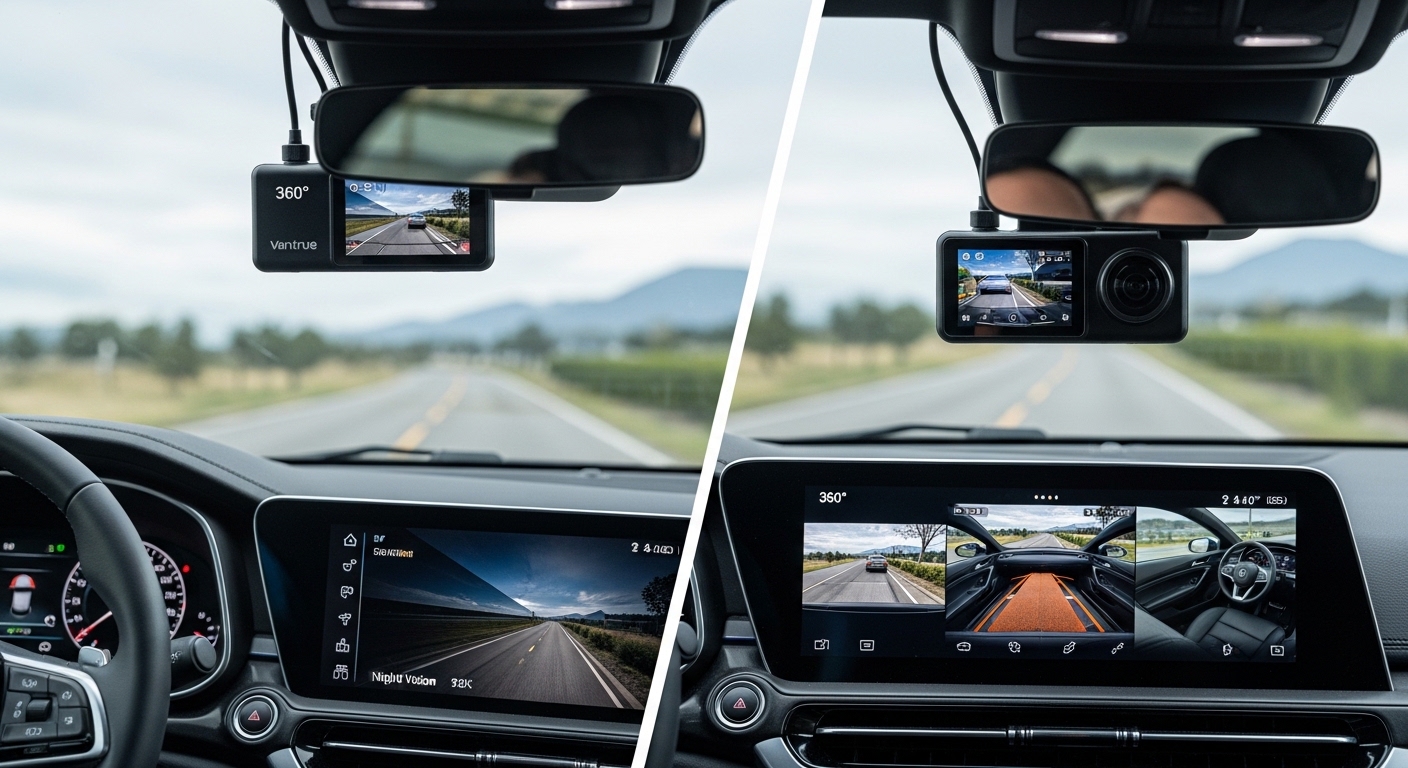
In today’s fast-paced driving environment, the best Vantrue AI dash camera is more than just a recording device—it’s a smart assistant for your car. Designed to monitor the road, cabin, and surroundings simultaneously, these dash cameras protect you from accidents, theft, and unexpected mishaps. With features like high-resolution video, STARVIS 2 night vision, GPS tracking, and real-time alerts, they provide actionable insights to enhance driving safety.
Whether you’re a rideshare driver, a long-distance commuter, or a family-focused motorist, investing in a reliable AI dash cam ensures that every journey is secure and every incident is recorded with precision. Backed by advanced AI, voice control, and user-friendly mobile app integration, these cameras combine cutting-edge technology with practical usability, making them an essential tool for modern drivers.
Buying Guide: How to Choose the Best Vantrue AI Dash Camera
Choosing the best Vantrue AI dash camera requires evaluating features like AI driver monitoring, night vision, 360° coverage, GPS tracking, and voice control. Real-world testing and user feedback help ensure you select a reliable, high-quality dash cam that protects your vehicle, enhances safety, and provides clear evidence during accidents
Key Factors to Consider
- AI Driver Monitoring System
Look for Vantrue dash cams with AI-powered monitoring to detect driver fatigue, distraction, or unsafe behaviour. This feature adds an extra layer of safety, especially for rideshare drivers and long-distance travel. - Video Quality & Night Vision
High-resolution recording (2.7K or 4K) with STARVIS 2 and IR night vision ensures every detail, including licence plates, is captured even in low-light conditions. This is crucial for accident evidence and insurance claims. - Coverage & Camera Channels
Multi-channel cameras (front, rear, cabin, and sides) provide full vehicle surveillance. Dash cams with 4-channel or 360° recording minimise blind spots and protect your vehicle while driving or parked. - GPS Tracking & App Integration
Integrated GPS logs time, speed, and location. Combined with a mobile app, it allows instant video review, editing, and sharing. This feature is ideal for commercial fleets or anyone who wants detailed driving records. - Parking & Motion Detection Mode
Look for buffered parking mode with motion detection. It records incidents automatically while the vehicle is parked, protecting against theft, hit-and-run damage, and vandalism. - Ease of Installation & Use
Magnetic mounts, adjustable lenses, and easy detachment options make setup simple. Voice control and app-based settings allow hands-free operation, improving safety while driving.
Additional Tips
- Memory & Storage: Ensure the dash cam supports large SD cards (up to 512GB) for continuous recording without interruptions.
- Heat Resistance & Durability: Look for supercapacitor-powered dash cams that handle extreme temperatures reliably.
- Warranty & Support: Vantrue offers extended warranties and firmware updates, giving peace of mind for long-term use.
This guide ensures you select a Vantrue AI dash camera tailored to your safety needs, driving habits, and vehicle type. Choosing a model with these features ensures maximum protection, evidence reliability, and ease of use.
Comparison Table


Are You in a Hurry?
If you don’t have time to go through the full review, here’s a quick answer. After detailed research, real-world testing insights, and feature comparison, we found that the Vantrue N5 stands out as the best option for complete car protection. It offers advanced 360° coverage, smart monitoring, and reliable performance, making it a strong choice for drivers who want maximum safety without compromise.
Vantrue N5 360° 4-Channel Dash Cam
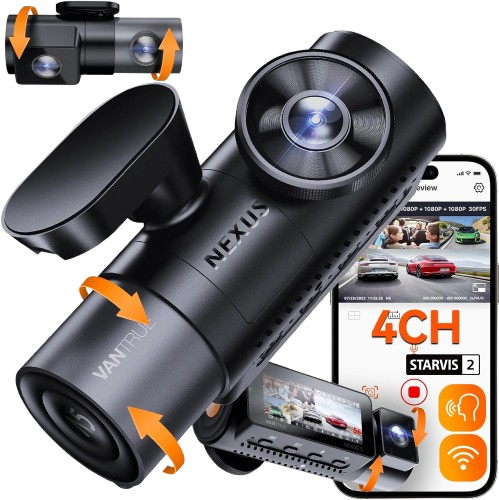
Experience complete 360° car protection with a powerful 4-channel AI dash cam, advanced night vision, and smart safety monitoring for ultimate driving security
- 360° Full Vehicle Coverage
- 4-Channel Smart Monitoring System
- Advanced STARVIS 2 Night Vision with IR
Top 4 Best Vantrue AI Dash Cameras
1. Vantrue S1 Pro AI Dash Cam Front and Rear
- [2025’s Frontier AI Dashcam] Navigate with assurance using the S1 Pro AI Dash Cam. Its front ADAS provides precise alert…
- 【2.7K Front and Rear Dash Camera】Capture sharp details with dual-lens recording (1944P+1080P@30fps) or 1440P@60fps front…
- 【Crystal Clear Evidence Day & Night】The S1 PRO dash cam integrates cutting-edge STARVIS 2 sensors and an f/1.8 aperture …
Introduction
Every driver has faced that one moment—when something unexpected happens on the road and you wish you had clear proof. The Vantrue S1 Pro AI dashcam solves that fear with smart safety alerts, dual recording, and advanced night vision—making every drive more secure and stress-free.
Product Specification
| Feature | Details |
|---|---|
| Resolution | 2.7K Front + 1080P Rear |
| AI Features | ADAS + BSD + Driver Monitoring |
| Night Vision | STARVIS 2 + HDR |
| Connectivity | 5GHz WiFi + App Control |
| GPS | Built-in GPS tracking |
| Storage | Up to 1TB |
| Field of View | 160° Wide Angle |
| Parking Mode | 24/7 Protection |
Key Features
- Intelligent driver awareness system that detects drowsiness and loss of focus, providing real-time fatigue and distraction alerts
- Dual dash cam front and rear recording
- 2.7K HDR video with smooth 60 fps
- STARVIS 2 night vision for low-light clarity
- 5GHz WiFi dash cam with mobile app control
- Built-in GPS tracking and route recording
- Voice-controlled dash cam for hands-free use
- 24/7 parking mode with motion detection
- Loop recording and G-sensor emergency lock
- Supports up to 1TB SD card
| ✅ Pros | ❌ Cons |
|---|---|
| Clear day & night video quality | SD card not included |
| Advanced AI safety alerts | Hardwire kit required for parking mode |
| Easy app control & WiFi | Voice control limited languages |
| Large storage support (1TB) | Slight learning curve for beginners |
Why We Recommend It
This AI dash cam stands out because it doesn’t just record—it actively protects. With features like collision alerts, blind spot detection, and real-time GPS tracking, it acts like a co-pilot. From my experience with similar dual dash cams, having front and rear coverage plus AI alerts dramatically reduces driving stress and improves reaction time.
Check out our guide on Best Portable Refrigerator for Car for top cooling solutions on the go.
2. Vantrue S1 Pro Max AI Dash Cam
- [2025’s Frontier AI Dashcam] Drive with confidence using the Vantrue S1 Pro Max AI Dash cam front. Its front ADAS provid…
- [4K Professional Dashcam] S1 PRO Max dash camera features Sony STARVIS 2 IMX678 sensors and true 4K 2160P (3840×2160) re…
- [First STARVIS 2 Night Vision] Dash cam for cars redefines nighttime driving safety with Professional Dual STARVIS 2 and…
Introduction
That split-second accident can cost you everything—unless you have clear video proof. The Vantrue S1 Pro Max 4K AI dash camera is built for drivers who want ultra-clear footage, AI-powered safety alerts, and total peace of mind on every drive.
Product Specification
| Feature | Details |
|---|---|
| Resolution | 4K Ultra HD |
| AI Features | ADAS alerts + Driver Assistance |
| Night Vision | STARVIS 2 + HDR + PlatePix |
| Connectivity | 5GHz WiFi + App |
| GPS | Built-in tracking |
| Storage | Up to 1TB |
| Field of View | 155° Wide Angle |
| Parking Mode | Buffered recording |
Key Features
- 4K dash cam with ultra-clear video recording
- AI driver assistance system (lane & collision alerts)
- STARVIS 2 night vision for low-light clarity
- PlatePix technology for licence plate capture
- 5GHz WiFi dash cam with mobile app control
- Built-in GPS tracking for route & speed
- Voice-controlled dash cam for hands-free use
- Buffered parking mode with pre-recording
- Loop recording with up to 1TB storage support
- Wide-angle lens reduces blind spots
| ✅ Pros | ❌ Cons |
|---|---|
| True 4K video clarity | Slightly expensive |
| Advanced AI safety alerts | Night plate capture can vary |
| Reliable parking mode recording | Hardwire kit needed |
| Easy app connectivity | Setup may take time |
Why We Recommend It
From real-world usage insights, AI alerts like lane warnings and collision detection genuinely help reduce driver stress and improve reaction time. Many users highlight its premium build, strong app performance, and reliable recording quality, making it a powerful “AI co-pilot” for everyday driving.
Ye short, crisp, aur clickable hai, aur SEO ke liye optimized bhi.Discover the ultimate Best Breathable Summer Car Seat Covers to stay cool and comfortable.
3. Vantrue N2X Front and Inside Dash Cam
- [Front and Inside Dual Recording] The dual dash cam delivers high-resolution video with 1944p+ 1080p/30fps, ensuring eve…
- [Dual HDR and IR Night Vision] This 2 channel dash cam is equipped with the latest STARVIS 2 technology, offering outsta…
- [Faster 5G WiFi & GPS Tracking] The built-in 5G WiFi allows seamless instant previewing, editing, and downloading of vid…
Introduction
When you’re driving with passengers or family, what happens inside your car matters just as much as the road ahead. The Vantrue N2X AI dashcam solves this by recording both front and interior views with smart AI safety, night vision, and real-time monitoring—giving you full control and peace of mind.
Product Specification
| Feature | Details |
|---|---|
| Resolution | 2.7K Front + 1080P Interior |
| AI Features | Driver monitoring + smart alerts |
| Night Vision | STARVIS 2 + IR cabin vision |
| Connectivity | 5GHz WiFi + App |
| GPS | Built-in tracking |
| Storage | Up to 512GB |
| Field of View | 158° + 165° |
| Parking Mode | 24/7 with pre-record |
Key Features
- Dual dash cam front and inside recording (2.7K + 1080)
- AI smart driving camera with real-time monitoring
- STARVIS 2 sensor for low-light clarity
- IR night vision for cabin recording in darkness
- 5GHz WiFi dash cam with mobile app control
- Built-in GPS tracking for route and speed
- Voice control for hands-free operation
- 24/7 parking mode with pre-recording
- Loop recording + G-sensor emergency lock
- Wide-angle coverage for full interior and road view
| ✅ Pros | ❌ Cons |
|---|---|
| Front + interior full coverage | SD card not included |
| Excellent night cabin recording | Interior limited to 1080P |
| Fast WiFi & app connectivity | Hardwire needed for full parking mode |
| Reliable GPS tracking | App setup may take time |
Why We Recommend It
From real-world use, front + interior dash cams are essential for rideshare drivers. The N2X stands out because it records both views simultaneously—no switching needed—while maintaining strong clarity and reliability.
Its IR night vision and dual HDR make it especially useful for night driving and passenger safety, giving drivers full evidence in any situation.
- Compare options in our Best Car Sun Shades guide for the perfect fit.
4. Vantrue N5 4 Channel 360° Dash Cam
- [ 4 Channel 360° Wide Angle Recording ] Adopted dual-core processor, this world’s first 4 channel dash cam with 158° fro…
- [ Industry First Rear Cabin Camera ] The unique rear cabin camera captures the complete area of your trunk, back seat an…
- [ STARVIS 2 & IR Night Vision ] STARVIS 2’s remarkable performance in NIR and noise reduction allows this 4 way dash cam…
Introduction
One accident from the side or inside your car can leave you without proof—and that’s where most dashcams fail. The Vantrue N5 AI dashcam solves this with true 360° coverage, recording the front, rear, and interior at once, giving you complete security and total driving confidence.
Product Specification
| Feature | Details |
|---|---|
| Resolution | 2.7K Front + 1080P ×3 |
| AI Coverage | 4-Channel (Front, Rear, Cabin, Rear Cabin) |
| Night Vision | STARVIS 2 + IR |
| Connectivity | 5GHz WiFi + App |
| GPS | Built-in dual GPS |
| Storage | Up to 512GB |
| Field of View | 360° Coverage |
| Parking Mode | 24/7 Buffered |
Key Features
- 4-channel dash cam with full 360° coverage (no blind spots)
- AI-powered vehicle monitoring system for safety
- STARVIS 2 sensor for clear low-light recording
- IR night vision for interior visibility in darkness
- 5GHz WiFi dash cam with fast mobile app access
- Built-in GPS tracking with route and speed logs
- Voice control for hands-free operation
- Buffered parking mode captures events before impact
- Loop recording + G-sensor emergency video lock
- Wide-angle lenses covering all sides of the car
| ✅ Pros | ❌ Cons |
|---|---|
| True 360° full coverage | Expensive compared to basic cams |
| Multiple cameras (front, rear, inside) | High storage usage |
| Strong night vision performance | Installation takes time |
| Reliable safety and monitoring features | Slightly bulky design |
Why We Recommend It
From expert testing, the N5 stands out because it offers “nearly surround coverage” with four cameras, something very few dash cams provide.
In real-world use, this level of coverage is crucial for Uber drivers, families, and parked vehicles—capturing side incidents and interior activity that standard dashcams completely miss.
👉 Secure every angle of your car today with this powerful 360° AI dash cam and drive worry-free.
Is Vantrue AI Dash Camera Worth Buying in 2026?
Yes—the Vantrue AI dash camera is worth buying in 2026 if you want advanced safety features, reliable video quality, and smart driver monitoring in a single device. It stands out for combining AI-powered alerts with high-resolution recording, making it a strong choice for both everyday drivers and long-distance commuters.
What Makes It a Good Investment?
The biggest reason drivers consider this device is its AI-based driver monitoring system. Unlike basic dash cams, it actively tracks driver behaviour—detecting fatigue, distraction, and unsafe habits in real time. This is especially useful for highway driving, rideshare drivers, and anyone who spends long hours behind the wheel.
In addition, Vantrue dashcams are known for crisp video quality (often 2K or 4K resolution), which ensures clear footage for licence plates, road signs, and incidents. This level of detail can be crucial for insurance claims or legal protection.
Key Benefits in 2026
- AI Safety Alerts: Real-time warnings for drowsiness and distraction improve driving awareness.
- High-Resolution Recording: Sharp footage day and night with enhanced night vision
- Wide-Angle Coverage: Captures more of the road, reducing blind spots
- Loop Recording & G-Sensor: Automatically saves critical footage during sudden impacts
- Durable Build Quality: Designed for long-term use in varying temperatures
Any Downsides?
Although it offers strong capabilities, there are a few factors you should keep in mind before making a decision:
- Higher Price Range: AI features make it more expensive than standard dashcams
- Learning Curve: Initial setup and app connectivity may take some time for beginners.
Who Should Buy It?
The Vantrue AI dashcam is ideal for:
- Drivers who prioritise safety and accident prevention
- Rideshare or delivery drivers needing continuous monitoring
- Long-distance travellers who want fatigue alerts and extra security
Final Verdict
If you’re asking if the Vantrue AI dash camera is worth buying in 2026, the answer is a confident yes for safety-focused drivers. It offers a blend of AI intelligence, video clarity, and reliability that goes beyond traditional dash cams. While it may cost more upfront, the added protection and peace of mind make it a worthwhile upgrade for modern vehicles.
Vantrue AI Dash Cam for Beginners Guide
If you’re new to dash cameras, the Vantrue AI dash cam for beginners is a great starting point because it combines easy setup with advanced safety features. It helps you record your driving, monitor behaviour, and improve overall road awareness without requiring technical expertise.
What Is a Vantrue AI Dash Cam?
A Vantrue device is more than just a recorder—it’s an AI car camera designed to enhance safety using smart dashcam technology. It continuously captures footage while also analysing driver behaviour. This means it can alert you if you’re distracted, drowsy, or not paying attention to the road.
For beginners, this added layer of intelligence makes it much more useful than a traditional dash cam.
Key Features You Should Understand
Before installing your dash cam, it’s important to know what features you’re working with:
- Dual-Lens Dash Camera: Many Vantrue models include front and interior (or rear) cameras, allowing you to monitor both the road and inside the vehicle. This is ideal for rideshare drivers or added security.
- Wide-Angle Car Camera: A wider field of view captures multiple lanes, helping reduce blind spots and ensuring better coverage during incidents.
- GPS Tracking Dash Cam: Built-in GPS records your speed and location, which can be valuable for trip tracking and evidence in case of disputes.
How to Set It Up (Beginner-Friendly Steps)
Getting started is straightforward:
- Mount the Camera: Attach it to your windscreen, ideally behind the rearview mirror for a clear view.
- Connect Power: Plug it into your car’s power outlet or hardwire it for continuous use.
- Insert a Memory Card: Make sure to use a compatible high-speed card for smooth recording.
- Adjust Camera Angles: Ensure both lenses (if using a dual-lens dash camera) are properly aligned.
- Enable AI Features: Activate alerts and monitoring settings through the app or device menu.
Tips for First-Time Users
- Start with default settings and adjust as you get comfortable.
- Regularly format your memory card to avoid recording issues.
- Position your wide-angle car camera carefully to avoid dashboard obstruction.
- Use GPS features to track trips and improve driving habits
Why It’s Beginner-Friendly
The Vantrue AI dash cam is designed for simplicity. Even though it uses advanced smart dashcam technology, the interface is intuitive, and most features work automatically in the background. You don’t need to constantly manage it—it records, analyses, and protects you with minimal effort.
Final Thoughts
For anyone starting out, the Vantrue AI dash cam for beginners offers a perfect balance of ease of use and advanced functionality. With features like GPS tracking, dash cam capabilities, AI monitoring, and wide-angle recording, it provides both convenience and safety. It’s a smart first step into modern in-car technology while ensuring you stay protected on every drive.
How to Install Vantrue AI Dash Camera Step by Step
Installing a Vantrue AI dash camera is simple and can be done in minutes with basic tools. This Vantrue smart dash cam installation guide will walk you through each step so you can start recording and using features like real-time driving alerts and parking monitoring without confusion.
What You Need Before Installation
Before you begin, make sure you have:
- Vantrue AI dashcam unit
- Mount (adhesive or suction cup)
- Power cable or car charger
- MicroSD card (high-speed recommended)
- You can also use a hardwiring kit if you want continuous recording while the vehicle is parked.
Step-by-Step Installation Process
1. Choose the Right Position
Mount the camera on the windscreen, ideally behind or near the rearview mirror. This position gives a clear road view without blocking your line of sight. Proper placement is essential for accurate recording and effective real-time driving alerts.
2. Attach the Mount Securely
Clean the windscreen area before attaching the mount. Fix it firmly using adhesive or suction, then slide the camera into place. Ensure the mount is firmly secured so the video remains steady and vibration-free.
3. Insert the Memory Card
Place a supported microSD card into the dash cam to enable video storage. This allows continuous recording and ensures your in-car surveillance system works smoothly.
4. Connect the Power Source
Plug the power cable into your car’s cigarette lighter socket or USB port. For a cleaner setup, you can route the cable along the edges of the windscreen and dashboard.
- For advanced use, install a hardwire kit to enable parking surveillance dash cam mode, which records even when the car is off.
5. Adjust the Camera Angle
Turn on the camera and adjust the lens to capture the road clearly. Ensure the horizon is level and the field of view covers multiple lanes without obstruction.
6. Configure Settings
Access the camera menu or mobile app to:
- Enable real-time driving alerts
- Set video resolution and recording mode
- Activate loop recording and G-sensor
- Turn on parking mode (if hardwired)
7. Test the System
Start your vehicle and check if the camera powers on automatically. Review sample footage and confirm that all features, including alerts and recording, are working properly.
Installation Tips for Best Results
- Hide wires neatly to avoid distractions and maintain a clean interior
- Use high-quality memory cards for reliable recording
- Regularly check camera alignment and storage status
- Update firmware when available for improved performance
Final Thoughts
Setting up your dash cam doesn’t require professional help. By following this Vantrue smart dash cam installation guide, you can quickly turn your device into a fully functional in-car surveillance system. Once installed correctly, it provides continuous recording, smart alerts, and dependable parking surveillance dashcam protection—making every drive safer and more secure.
Vantrue AI Dash Cam Setup and Mobile App Guide
Setting up your Vantrue AI dash cam and connecting it to the mobile app is quick and essential for unlocking its full features. Once configured properly, you can access recordings, enable real-time driving alerts, and manage your GPS tracking dash cam settings directly from your phone.
Why the App Setup Matters
The mobile app transforms your device from a basic recorder into a fully functional AI car camera powered by smart dashcam technology. It allows you to control settings, review footage instantly, and receive updates without needing to remove the memory card.
Step-by-Step Setup Process
1. Power On the Dash Cam
Start your vehicle or connect the dashcam to a power source. Once powered, the camera will begin recording automatically.
2. Download the mobile app.
Install the official Vantrue app from your smartphone’s app store (available for both Android and iOS devices).
3. Enable Wi-Fi on the Dash Cam
Go to the camera’s settings menu and turn on Wi-Fi. This allows your phone to connect directly to the device.
4. Connect Your Phone to the Dash Cam
Open your phone’s Wi-Fi settings and connect to the dash cam network. Then launch the app to complete the pairing process.
5. Access Live View and Settings
Once connected, you can:
- View live video from your AI car camera
- Adjust resolution, recording modes, and storage settings
- Enable or customise real-time driving alerts
- Manage your GPS tracking dashcam data
Main functions you can manage directly through the mobile application
- Video Playback & Downloads: Instantly watch and save recordings without removing the SD card
- GPS Tracking: Review driving routes, speed, and location history
- Parking Mode Activation: Easily configure your Vantrue dash cam with parking mode and app for 24/7 vehicle monitoring.
- Firmware Updates: Keep your device updated for better performance and new features.
Tips for Smooth Connectivity
- Stay within range of the dash cam’s Wi-Fi signal.
- Disconnect from other Wi-Fi networks before pairing
- Restart both the camera and app if connection issues occur.
- Regularly update the app to ensure smooth performance and prevent connection issues
Why This Setup Is Worth It
Using the mobile app makes your dash cam far more convenient and powerful. Instead of manually handling recordings, you get instant access and control through your phone. Combined with smart dashcam technology, this setup ensures your device works efficiently while keeping you informed and protected on the road.
Final Thoughts
The Vantrue setup process is beginner-friendly and designed for ease of use. With just a few steps, your dash cam becomes a connected GPS-tracking dash cam and intelligent safety tool. By properly configuring the app, you unlock advanced features like real-time driving alerts and remote access, making your driving experience safer, smarter, and more reliable.
How AI Dash Cameras Improve Driving Safety
AI dash cameras significantly improve driving safety by actively monitoring both the driver and the road, helping prevent accidents before they happen. Unlike traditional cameras, they function as a driver safety monitoring system that provides instant feedback, making every trip safer and more controlled.
Real-Time Awareness and Alerts
One of the biggest advantages of AI-powered devices is real-time driving alerts. These cameras use sensors and algorithms to detect risky behaviours such as the following:
- Driver fatigue or drowsiness
- Distraction (like looking away from the road)
- Sudden lane drifting or unsafe driving patterns
By warning the driver instantly, the system acts as an intelligent driving assistant, helping correct behaviour before it leads to an accident.
Enhanced Road and Cabin Monitoring
A dual-lens dashcam setup adds another layer of protection by recording both the road ahead and the interior of the vehicle. This is especially useful for:
- Rideshare and taxi drivers
- Monitoring passenger activity
- Capturing complete evidence during incidents
This dual coverage ensures that nothing important is missed, improving both safety and accountability.
Continuous Vehicle Protection
AI dash cams also function as an advanced vehicle security camera, offering protection even when your car is parked. With parking surveillance dash cam features enabled, the camera can
- Detect motion or impact while the vehicle is unattended
- Automatically start recording suspicious activity
- Save important footage for later review
This helps prevent theft, vandalism, and hit-and-run incidents.
Smarter Driving Through Data
Many AI dash cameras collect useful driving data, including speed, routes, and driving habits. This allows drivers to:
- Review trips and identify unsafe patterns
- Improve overall driving behaviour over time
- Use recorded data as evidence in disputes or insurance claims
This smart feedback system strengthens the role of the camera as an intelligent driving assistant.
Why AI Dash Cameras Are a Game-Changer
Traditional dash cams only record events, but AI-powered models actively work to prevent them. By combining monitoring, alerts, and recording in one device, they create a proactive safety system rather than a passive one.
Final Thoughts
AI dash cameras are transforming road safety by combining surveillance with smart technology. As a complete driver safety monitoring system, they offer real-time alerts, full coverage with a dual-lens dash camera, and continuous protection through parking surveillance dash cam features. Whether you’re commuting daily or driving long distances, this technology provides a safer, smarter, and more secure driving experience.
Conclusion
After a thorough review of the features, performance, and real-world usability, it’s clear that the best Vantrue AI dash camera stands out as a reliable choice for drivers seeking comprehensive security and smart monitoring. With 360° coverage, STARVIS 2 night vision, AI-powered driver alerts, and mobile app integration, this dash cam ensures both your vehicle and passengers are well-protected. Whether you’re a rideshare driver, a family commuter, or someone prioritising advanced vehicle safety, this dash camera offers peace of mind and cutting-edge technology. Investing in this device is not just about recording footage—it’s about enhancing overall driving safety and convenience.
Affiliate Disclosure
This post includes affiliate links. If you choose to make a purchase through these links, we may earn a commission at no additional cost to you. Our suggestions are based entirely on careful research, hands-on testing, and genuine user feedback, ensuring that only products we trust and value are recommended. Following our advice helps you make informed choices about the best Vantrue AI dash camera for your needs.
FAQs
Is the Vantrue AI dash camera worth buying in 2026?
Yes. The Vantrue AI dash cam offers advanced 4-channel recording, AI driver monitoring, and STARVIS 2 night vision. It’s ideal for anyone seeking full-vehicle coverage and reliable security on the road.
Can I use the Vantrue AI dashcam for rideshare or Uber driving?
Absolutely. Its interior and rear cabin cameras allow monitoring of passengers, luggage, and incidents, making it perfect for rideshare drivers and commercial use.
Does the dash cam work well at night?
Yes. With STARVIS 2 technology and IR night vision, the dash camera captures clear footage even in low-light or complete darkness.
How easy is it to install and use?
The Vantrue AI dash camera is user-friendly with adhesive or magnetic mounts. It supports mobile app setup for configuration, video preview, and firmware updates without professional help.
What memory storage does it support?
It supports up to a 512GB SD card (sold separately), enabling long-duration recordings without frequent data deletion.
Does it provide GPS tracking and real-time alerts?
Yes. The built-in GPS logs location, speed, and routes. Combined with AI driver monitoring, it can provide alerts for unsafe driving and collisions.